


Angel: TV & Movies
3.785.00 Reviews
App Specs
- Version
- Varies with Device
- Updated On
- License
- Free
- Downloads
- 1,000,000+
- Developer
- Angel Studios, Inc.
- Categories
- Entertainment
- Platform
- Android
Screenshots

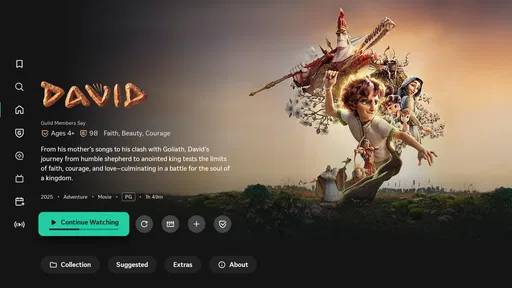
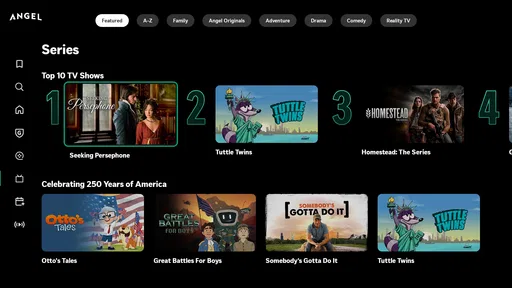

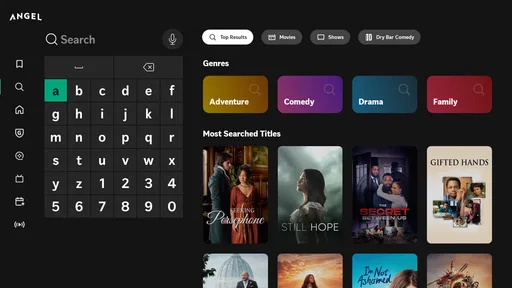
 Analysis by AppCompare
When I have a few minutes to spare and no clear idea what I want to watch, I usually want help deciding rather than another endless scroll. Angel: TV & Movies is aimed at that discovery problem, bringing entertainment browsing and viewing together in one app. It is made by Angel Studios, Inc., and its focus gives it a different feel from a general-purpose streaming service: I would approach it as a place to explore stories and find something that suits the moment, not as a guaranteed replacement for every service I already use.
Where the connection becomes part of the experience
Streaming is the part of an entertainment app where a weak or shifting connection matters most. A title can look appealing while you are browsing, but playback is the real test: on a stable home network, settling in to watch is straightforward; on mobile data or a crowded public Wi-Fi network, the experience depends more heavily on the connection available at that moment. I would choose what to watch before leaving home if I expected to have unreliable reception, rather than assume the app will behave the same everywhere.
That makes Angel a better fit for planned viewing than for treating every spare moment as an automatic streaming opportunity. If I am choosing something for a family evening, I can browse while connected comfortably, make a decision, and avoid spending the first part of the gathering searching. If I am heading into a commute with patchy service, I would not count on starting a video at the last minute. That is a practical distinction, not a knock on the app: video is simply less forgiving of connectivity changes than text or audio.
Using it in the small gaps of the day
Angel can also suit short browsing sessions: checking what is available during a lunch break, looking up a title a friend mentioned, or saving a possibility for later. The watchlist is especially useful in this stop-and-start routine. I can make a quick choice when I have a moment, then return when I actually have time to watch instead of trying to remember the title later.
For a realistic evening, imagine that I have a free half-hour after dinner and want to find something without asking everyone to browse separate services. I can use that time to explore, then make a decision before settling down. The trade-off is that browsing itself still needs a usable connection, and streaming asks more of that connection than simply looking at titles. If the network is already struggling, I would postpone the viewing rather than spend the whole break troubleshooting.
What to do when playback does not cooperate
When video pauses or takes too long to begin, it can be hard to tell whether the app or the network is responsible. My first move would be to check whether other online services are also slow, then try a steadier Wi-Fi connection if one is available. If only Angel is affected, closing and reopening it is a reasonable basic step before trying again. These small checks are more useful than repeatedly tapping play while the connection is still dropping.
There is a limit to what any streaming app can smooth over when coverage is poor. A person who watches in basements, on rural routes, or in places with congested public Wi-Fi should make connectivity part of the decision, not an afterthought. I would also avoid starting a long viewing session right before moving between networks: changing from home Wi-Fi to cellular service can interrupt the flow even when both connections work adequately on their own.
Worth Reading Before You Choose

EA SPORTS FC Mobile 26 Is a Bigger Football Game, but It Takes Time

Flipboard Shows What News Apps Must Do Beyond the Feed

Switching to Android Auto Means Rethinking Your Driving Routine

Google Calendar Makes a Crowded Week Easier to Manage

Ludo King Makes the Most of the Minutes Between Plans

Baby Panda World Brings Quick Play to Modern Phones, but Its Game Library Feels Busy
Keeping mobile use deliberate
Because streaming can consume mobile data, I treat cellular viewing as a choice rather than a default. If I am away from Wi-Fi, I would check my own data allowance and connection conditions before settling in for a full film or several episodes. The sensible habit is to browse and decide while connected to Wi-Fi, then reserve mobile data for moments when the convenience is worth it.
That approach is particularly helpful for households sharing a mobile plan or anyone who uses a limited data allowance for work, navigation, and messaging as well as entertainment. A short check-in to choose a title is different from leaving video running for a long stretch. I would not assume that a screen showing a title or a saved item means the video is ready to play without a connection; those are separate parts of the experience, and it is worth planning accordingly.
Getting Started with Angel
First things first, downloading Angel: TV & Movies is a breeze. Available on both Android and iOS, the app is free to download, which is always a nice start. Once you’ve got it installed, setting up your account is straightforward. You can even link it to your existing streaming subscriptions, which is super convenient. I love how it streamlines everything into one place, saving me from toggling between different apps.
User Interface and Design
The app’s design is sleek and intuitive, with a user-friendly interface that welcomes you with open arms. The main dashboard is organized into sections like Trending Now, New Releases, and Recommended for You. Each section is tailored to your viewing habits, so you’re not just seeing random suggestions. It feels personal, and that’s a big win in my book.
Navigation is a piece of cake. There’s a handy search bar at the top, and you can filter by genre, release year, or even by actor or director. I found myself exploring categories I hadn’t considered before, thanks to the app’s smart recommendations.
Features That Stand Out
One of my favorite features has to be the watchlist. It’s perfect for those "I’ll watch it later" moments. Just a simple tap, and it’s saved for you to revisit whenever you have some free time. The app also offers personalized notifications for new episodes or releases that match your interests. How cool is that?
Another neat feature is the community reviews. Sometimes, the best insights come from fellow viewers, and Angel does a great job of highlighting user reviews. It’s like having a movie club at your fingertips. I’ve discovered a couple of hidden gems this way!
Streaming Quality and Performance
No one likes buffering, and thankfully, Angel delivers on the streaming front. The app supports HD streaming, and during my testing, I didn’t encounter any annoying lags or interruptions. It’s smooth sailing, even when switching between different shows or movies. Plus, there’s an offline mode for those times when you’re without Wi-Fi but still need your entertainment fix.
Content Variety
When it comes to content, Angel doesn’t disappoint. The app boasts a vast library, including everything from blockbuster hits to indie darlings and classic TV series. There’s something for everyone, whether you’re into action-packed thrillers or heartwarming rom-coms. I was pleasantly surprised at the range, and I’m betting you will be, too.
Choosing Angel over a general streaming app
Compared with the large, broad catalogs people often browse for mainstream films and series, Angel’s appeal is more specific: I would open it when I want to explore the entertainment it brings together, rather than expect it to be a universal directory for everything available across every service. That distinction helps set expectations. If your main goal is to keep track of titles and discover options in Angel’s orbit, its recommendations, search and watchlist are more useful than jumping between unrelated catalogs. If you need the widest possible selection of a particular genre or want all your subscriptions managed in one place, your usual streaming apps may still be the better starting point.
The app is free to install, but that does not mean every possible purchase is free. In-app items range from $12 to $179 each, so I would review the price and what an item offers before confirming anything. That is especially sensible if children share the device or if you are trying to keep entertainment spending predictable. Angel is rated Teen, which is also worth keeping in mind when deciding whether its content and community experience suit younger viewers in your household.
Who is likely to get the most from it?
I can see Angel working well for viewers who like discovering films and shows through recommendations and community opinions, and for people who want a dedicated place to browse its entertainment rather than rely entirely on a general streaming homepage. It is also handy for anyone who likes to collect possibilities in a watchlist during the day and choose later, when there is time to watch properly. The app has an average rating of 3.8 from around 700 ratings, with about 70 written reviews, and has passed 500,000 installs. Those figures suggest a meaningful audience, though they cannot tell me whether its particular content mix will match your taste.
I would be less likely to recommend it as a sole entertainment app to someone who wants a vast, all-purpose catalog, or to a viewer who often streams in places with unstable service and has no reliable alternative connection. It may also be a poor match if you prefer to avoid community commentary or notifications; those features are useful to some people, but not essential to enjoying a film. The practical test is whether Angel’s selection and discovery style give you enough reasons to return after the first browse.
Small habits that make browsing more useful
One useful approach is to treat the watchlist as a decision queue, not a permanent storage box. When I add a title, I can use the next browsing session to decide whether it still sounds right, then remove anything that no longer interests me. That keeps the list helpful when a group is waiting for a quick choice. Community reviews can add context, but I would read them as individual reactions rather than a substitute for checking whether the subject or tone suits the people watching.
Personalized notifications can help surface new releases or episodes, but I would keep them only if they genuinely save me a search. If they become noise, turning down notifications at the device level is a straightforward way to reclaim attention. And when I am choosing a title for a shared screen, I would search or browse before everyone sits down: it is easier to compare a few options calmly than to negotiate while a film is already supposed to be starting.
What to expect from the first visit
Angel is free to download and is available for Android and iOS; its release date was February 24, 2022, and Android users need version 7.0 or later. Those details make it accessible to many existing devices, although a compatible operating system alone does not guarantee that streaming will feel smooth: the quality of the connection still matters. I would install it while on Wi-Fi, take a little time to browse, and decide whether its selection is relevant to me before building it into my regular routine.
The follow-up question I would ask before watching away from home is simple: do I have a stable connection and enough mobile data for the session I have in mind? Before paying for anything, I would ask whether the item is a one-time purchase and whether it fits my budget. And before handing the app to a younger family member, I would consider the Teen rating and supervise purchases as appropriate. These are small checks, but they prevent the common mismatch between expecting a free download, unlimited mobile viewing, and no additional costs.
Final Thoughts
All in all, Angel: TV & Movies is a fantastic addition to your app arsenal if you’re a movie and TV show enthusiast like me. It’s got a little bit of everything: an easy-to-use interface, a plethora of features, and a library that’ll keep you entertained for days. Whether you’re looking to discover new favorites or just want a more organized way to manage your viewing habits, Angel has you covered.
So, next time you’re stuck in a viewing rut, give Angel a try. Who knows? You might just find your next binge-worthy obsession. Happy streaming!
My connectivity verdict
For me, the strongest way to use Angel is to browse with a steady connection, save promising choices, and stream when I know the network can keep up. It makes sense for someone who values discovery and community input and is comfortable planning around mobile data. If reliable offline viewing or a consistently broad, cross-service catalog is the deciding factor, I would choose a service that clearly meets that need instead. With that distinction in mind, Angel is worth trying as a focused entertainment app rather than expecting it to solve every streaming situation.
Pros
- User-friendly interface with intuitive navigation.
- Extensive library of popular TV shows and movies.
- High-quality streaming with minimal buffering.
- Regular updates with new content additions.
- Supports offline viewing for on-the-go access.
Cons
- Limited availability in certain regions.
- Ads can be intrusive in the free version.
- Requires a stable internet connection.
- Some popular titles may be missing.
- Subscription cost might be high for some users.
FAQs for Angel: TV & Movies
What content is available on Angel: TV & Movies?
Angel: TV & Movies offers a diverse range of content including classic films, popular TV shows, and exclusive original series. The app caters to various genres such as drama, comedy, action, and documentaries. Users can explore a rich library that updates regularly to include new releases and trending titles.
Is Angel: TV & Movies free to use?
Angel: TV & Movies offers both free and premium content. While some shows and movies are available at no cost, premium content requires a subscription. The app also provides a free trial for new users, allowing them to explore premium features before committing to a paid plan.
Can I download content for offline viewing?
Yes, Angel: TV & Movies allows users to download select content for offline viewing. This feature is particularly useful for users who want to watch movies and shows on the go without relying on an internet connection. However, not all content may be available for download.
Is Angel: TV & Movies available on multiple devices?
Angel: TV & Movies is compatible with a wide range of devices, including smartphones, tablets, and smart TVs. The app supports both Android and iOS platforms, ensuring a seamless viewing experience across multiple devices. Users can easily switch between devices without losing track of their progress.
How does Angel: TV & Movies handle user privacy and data security?
Angel: TV & Movies prioritizes user privacy and data security. The app employs advanced encryption technologies to protect personal information and viewing habits. Users can review the privacy policy within the app to understand how their data is collected, used, and stored, ensuring transparency and trust.


